Building an NFT System
You can mint and store NFTs in all types of wallets.
However, the wallet must have NFT permission, so select Use NFT when creating the wallet.
NFT contract
✳️
NFT contracts minted with the Octet API support meta transactions. (Supported platforms:
ETH,POL,AVAX)
Deployment process
To mint NFT items, you need an NFT contract. The contract is deployed by the following process.
- Request contract deployment.
- Generate a transaction.
- Calculate the optimal fees and propagate the transaction.
- Deployment is completed when the transaction is confirmed in the blocks.
Deploying
1. Deploy from the console
You can deploy a new contract from [NFT] on the console.
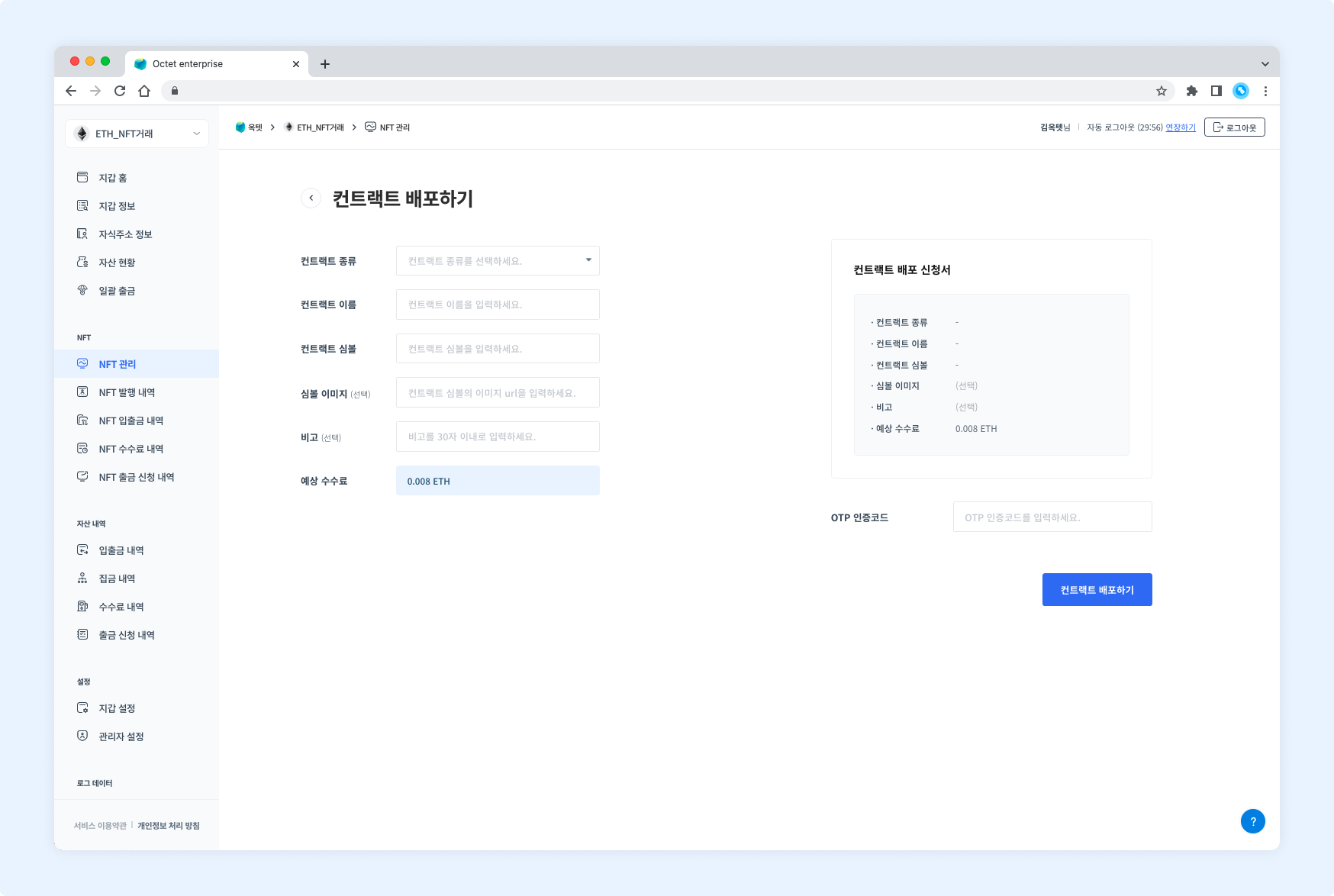
2. Deploy with the API
You can request the deployment of a new contract by calling the Request NFT Contract Deployment API. The uuid value will be returned when the deployment request is successful. The value can be used to check the deployment progress.
Response example
{
  "uuid": "948019e6-fc25-4278-9b73-b089aaa1e1c1"
}
Deployment confirmation
1. Check from the console
You can check the contract deployment status from [NFT Mints] on the console.
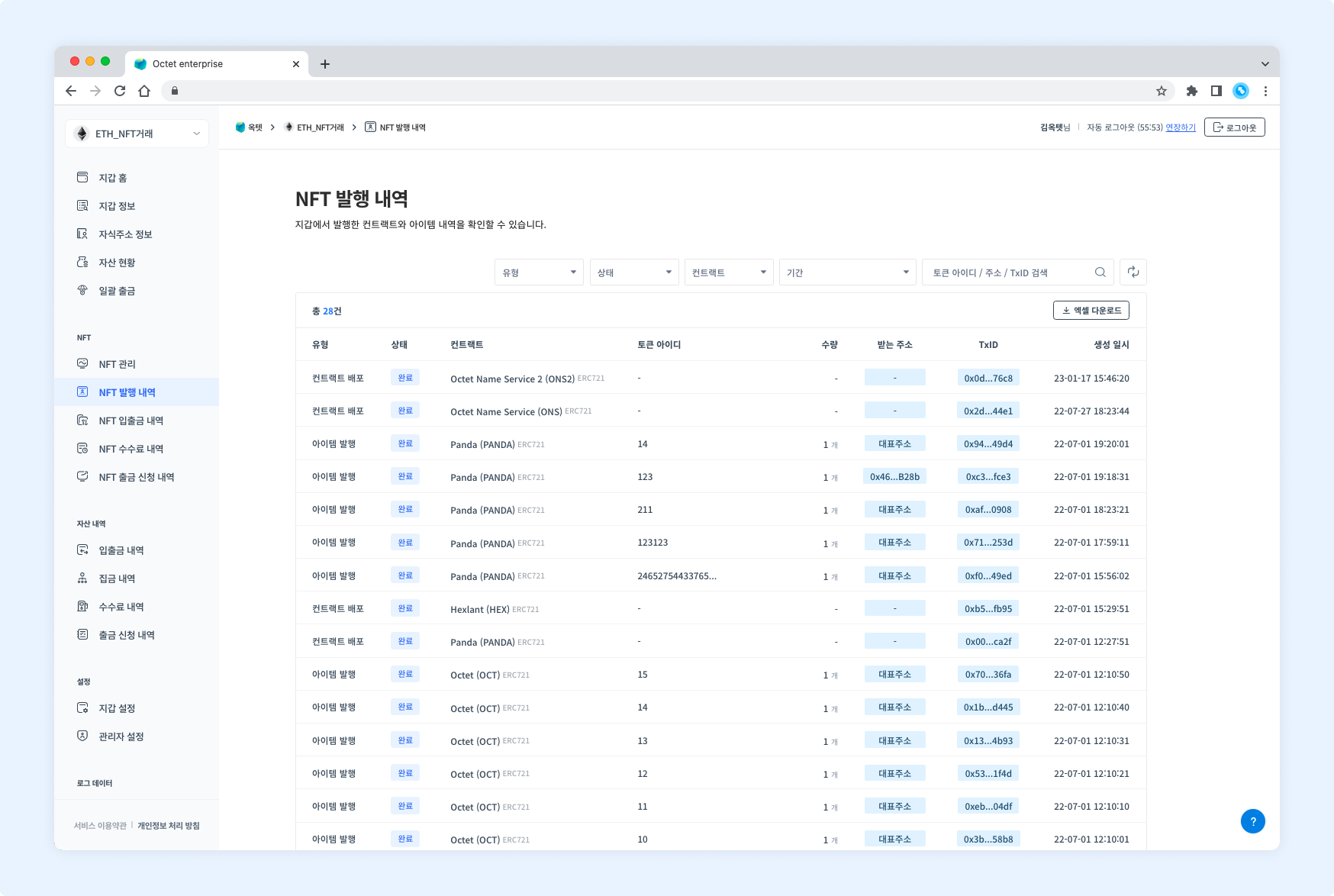
2. Check with the API
You can check the progress of a specific deployment transaction by calling the Get NFT Contract List API.
Response example
[
  {
    "symbol": "HEX",
    "nameKo": "hexlant-octet",
    "nameEn": "hexlant-octet",
    "status": "ACTIVATED",
    "type": "ERC721",
    "contractAddress": "0x05fb500DBCD9828AD7Bb9EaE3bD6E436860e14fE",
    "iconUrl": "https://tetco-user-console-frontend.blockchainapi.io/images/logo-icon.png",
    "isExternal": false,
    "createdDate": "2022-05-17T02:03:21.110Z",
    "modifiedDate": "2022-05-17T02:03:21.110Z"
  }
]
Deployment status
| Status name | Description |
|---|---|
PENDING | Deployment transaction is generated |
UNFINALIZED | Deployment transaction is included in the blocks |
FINALIZED | Deployment transaction is included in the blocks and additional blocks have been generated |
FAILED | Deployment transaction failed |
Deployment fees
Contract deployment fees are deducted from the main address. Therefore, the main address must hold coins (ETH, POL, etc.) to pay the fee. The deployment will not proceed if the deployment fee is insufficient.
NFT item
Minting process
Mints NFT items from the deployed contract to a specific address. Each item has a unique ID, which consists of numbers. At this point, each item must contain metadata.
👀 What is metadata?
Metadata is data in JSON format containing the assets (images, videos, etc.) included in the NFT item. The data is stored using a trusted method of the client or a distributed file storage method such as IPFS. When minting an NFT item, enter the URI pointing to the metadata in JSON format. Create the metadata URI by referring to the following guide.
Minting
1. Mint from the console
You can mint a new NFT item from [NFT] - Select a contract - [Mint Item] on the console.
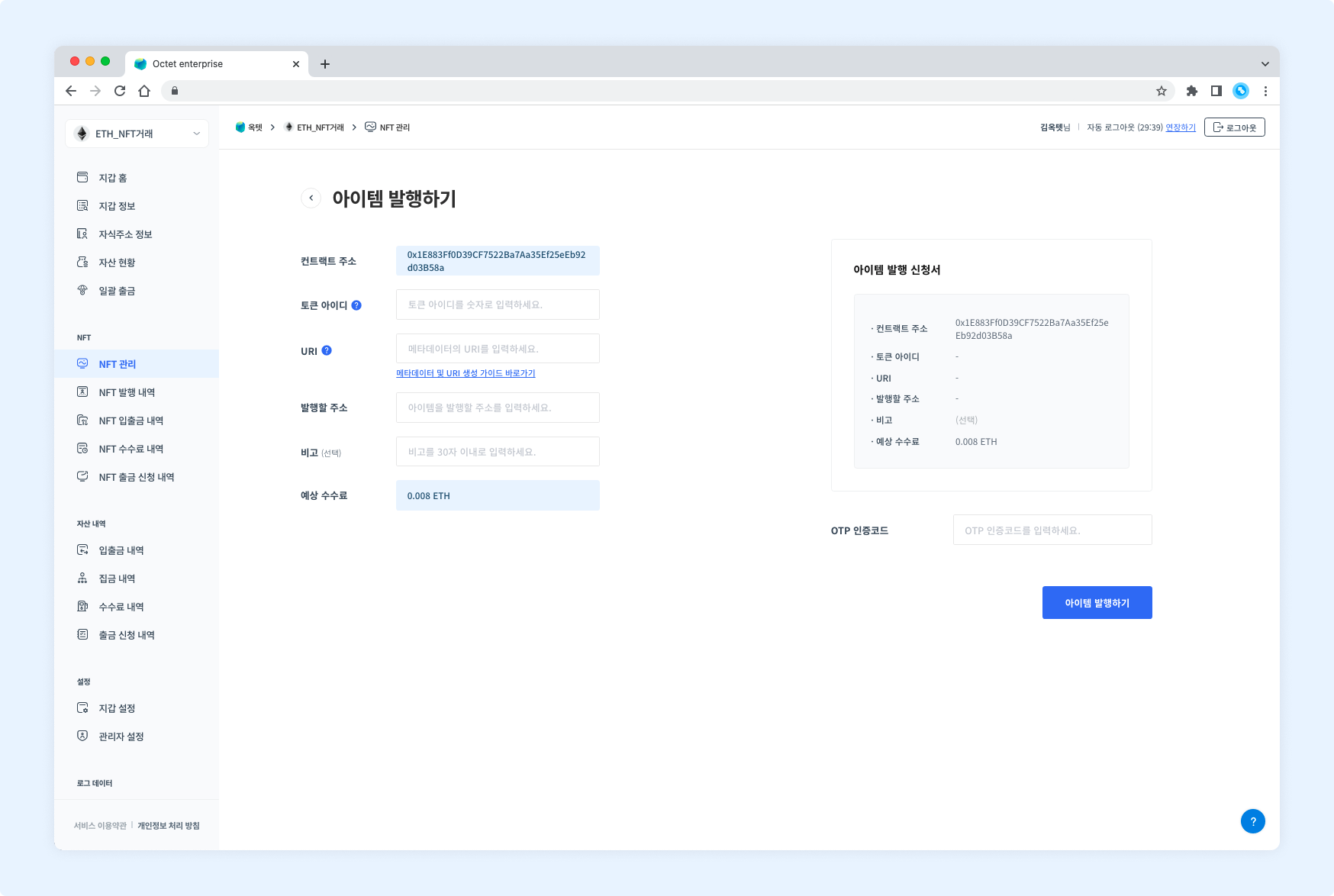
2. Mint with the API
You can mint a new NFT item by calling the Request NFT Item Minting API. Minted items can be checked by calling the Get NFT Item List API.
Response example
{
  "uuid": "eefec795-cce1-43e2-b678-6e84dcc83a8a"
}
Minting confirmation
1. Check from the console
You can check the minting status of NFT items from [NFT Mints] on the console.
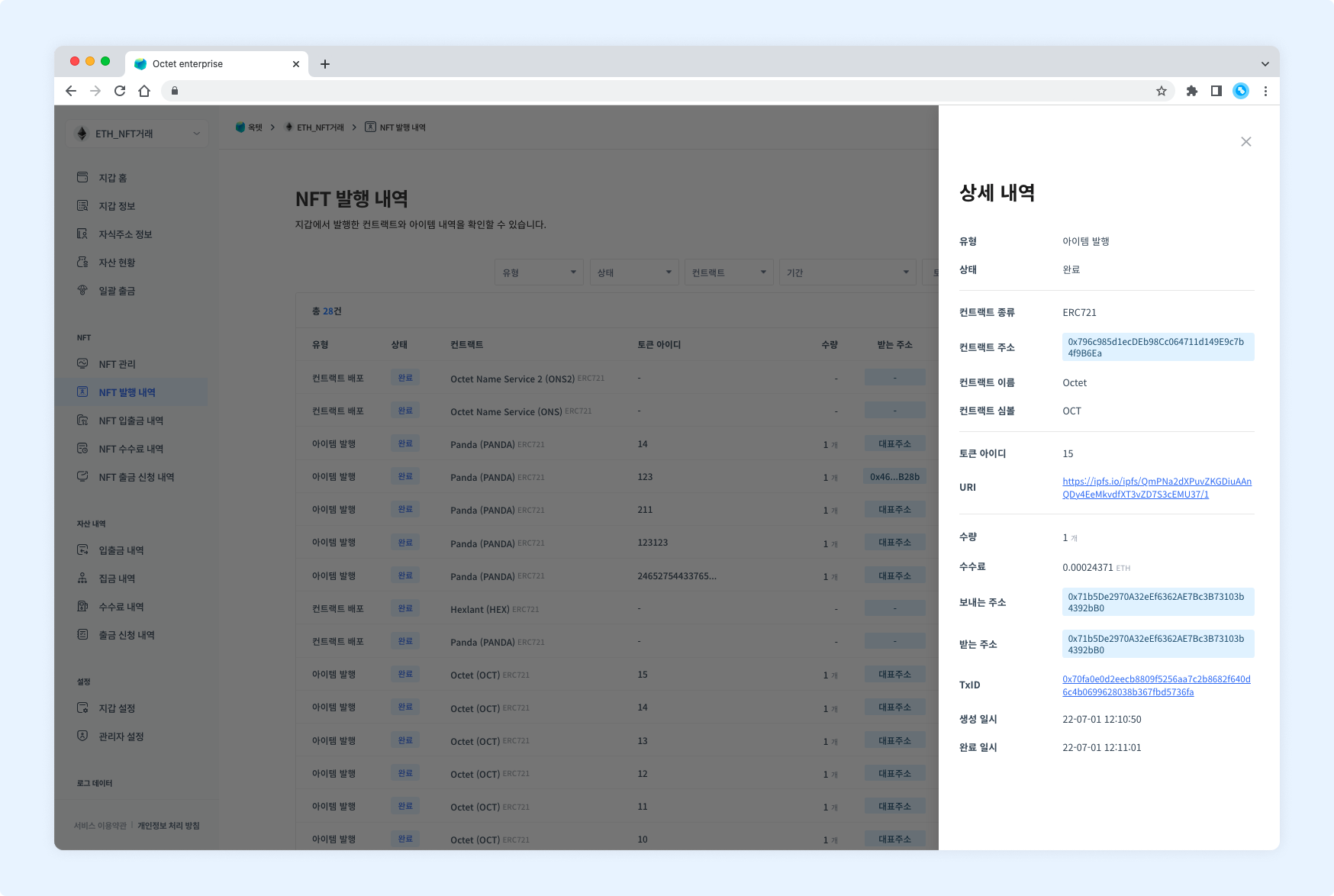
2. Check with the API
You can check the progress of a specific item's minting transaction by calling the Get NFT Item List API.
Response example
[
  {
    "tokenId": "2205171109",
    "amount": 1,
    "tokenUri": "https://ipfs.io/ipfs/QmPNa2dXPuvZKGDiuAAnQDy4EeMkvdfXT3vZD7S3cEMU37/1",
    "status": "ACTIVATED",
    "createdDate": "2022-05-17T02:33:20.896Z",
    "modifiedDate": "2022-05-17T02:33:22.035Z",
    "nftItemBalances": [
      {
        "amount": 1,
        "address": {
          "idx": 54,
          "address": "0x71b5De2970A32eEf6362AE7Bc3B73103b4392bB0",
          "name": "NotMainAddress",
          "derivationIndex": 0,
          "type": "ETHEREUM_EOA",
          "status": "ACTIVATED",
          "createdDate": "2021-12-23T08:51:29.499Z",
          "modifiedDate": "2022-05-17T02:33:11.000Z"
        }
      }
    ]
  }
]
Minting status
| Status name | Description |
|---|---|
PENDING | Minting transaction is generated |
UNFINALIZED | Minting transaction is included in the blocks |
FINALIZED | Minting transaction is included in the blocks and additional blocks have been generated |
FAILED | Minting transaction failed |
Minting fees
Item minting fees are deducted from the main address. Therefore, the main address must hold coins (ETH, POL, etc.) to pay the fee. Minting will not proceed if the minting fee is insufficient.
NFT deposit
NFTs minted outside Octet can be deposited to an Octet main address or child address.
Deposit method
1. Whitelist deposit
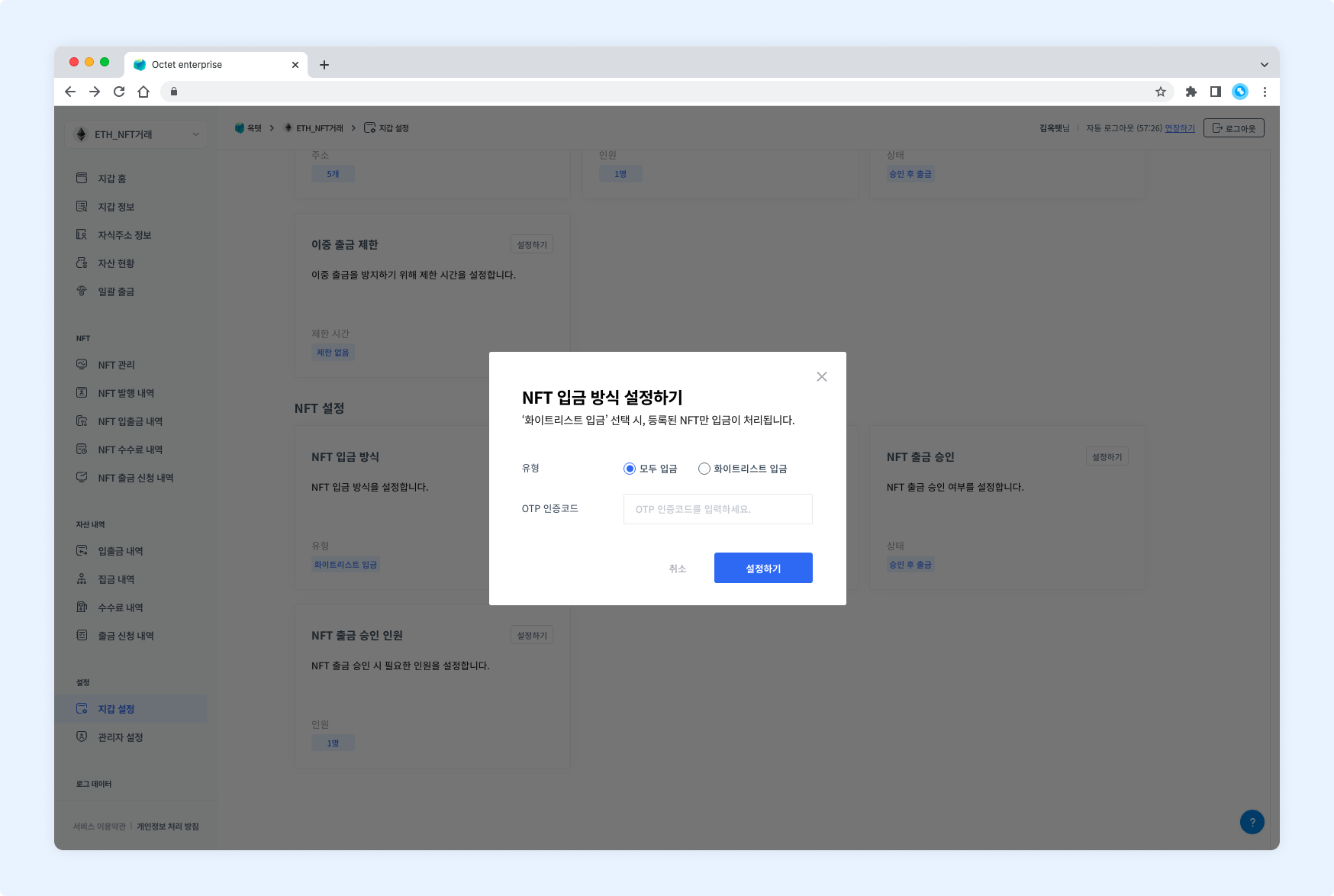
When the deposit method is 'Whitelist Deposit', only NFTs registered in the whitelist are processed as deposits. NFTs deposited before the contract is registered are not processed as deposits automatically, even if the contract is registered later.
- Deposit method setting: You can set
Whitelist Depositfrom [Wallet Settings] - NFT tab - [NFT Deposit Method] on the console. - Whitelist registration: You can register a contract by calling the Register NFT Contract API or from [Wallet Settings] - NFT tab - [NFT Deposit Whitelist] on the console.
2. Deposit all
Without having to register the deposit whitelist every time, the contract is registered automatically whenever an NFT is deposited and the deposit is processed.
- You can set
Deposit Allfrom [Wallet Settings] - NFT tab - [NFT Deposit Method] on the console.
Deposit confirmation
1. Check from the console
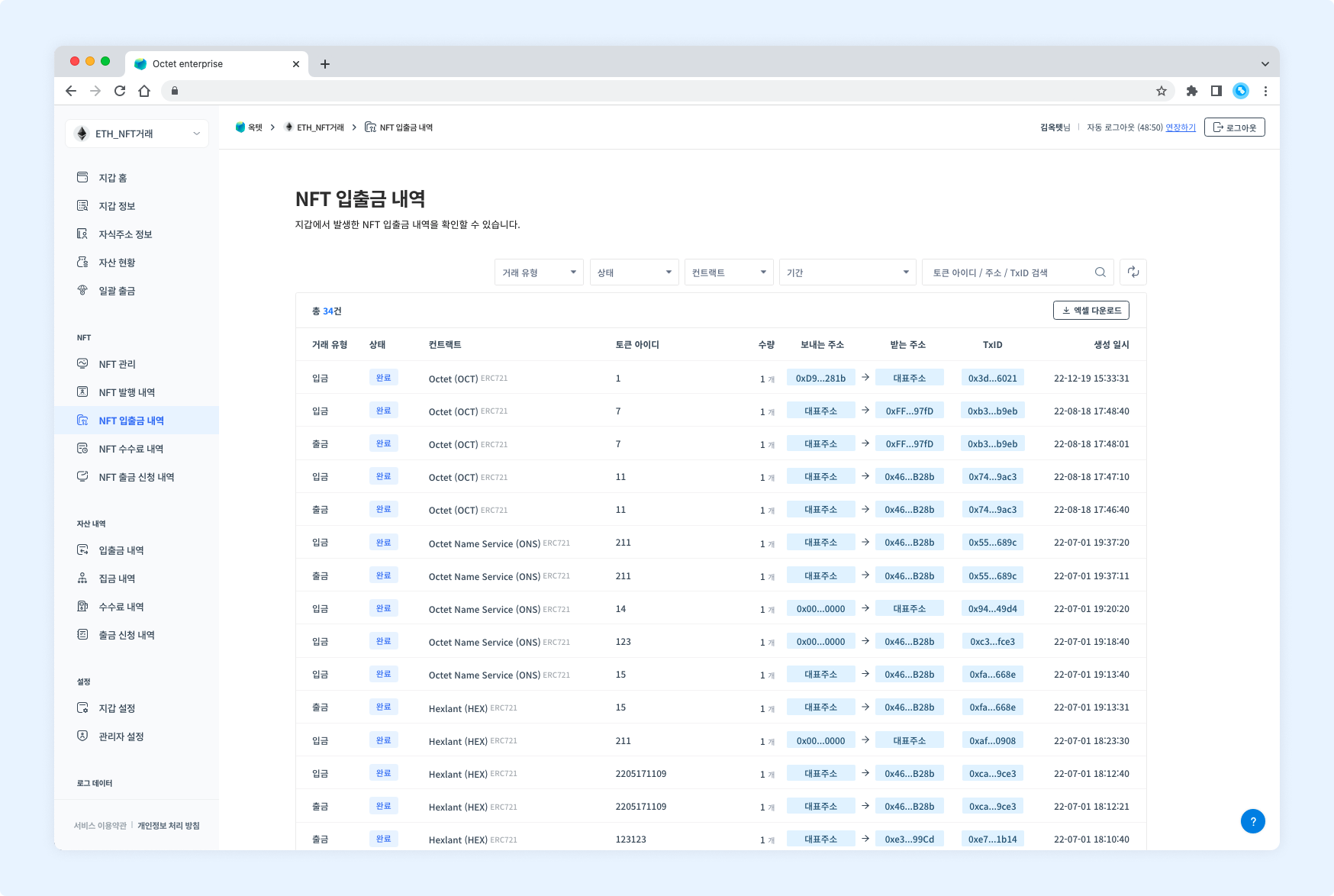
You can check the deposit history from [NFT Transactions] on the console. UNFINALIZED deposits are displayed as 'In progress', and FINALIZED deposits are displayed as 'Completed'.
2. Check with the API
You can check the list of deposit transactions by calling the Get NFT Transaction List API.
3. Check with webhooks
When a deposit to the main address or a child address is completed, a deposit webhook is sent. You can check the deposit status from the webhook. For more information about how to use webhooks and their data structure, see the Webhook page.
NFT withdrawal
Withdrawal process
Both centralized wallets and child address withdrawal wallets withdraw NFT items from the main address and child addresses to the outside. In a centralized wallet, NFTs deposited to child addresses are not gathered to the main address, so NFT items can be withdrawn from child addresses.
- Request withdrawal.
- Generate a transaction.
- Calculate the optimal fees and propagate the transaction.
- Withdrawal is completed when the transaction is confirmed in the blocks.
Withdrawing
1. Withdraw from the main address
You can request an NFT item withdrawal from the main address to the outside by calling the Request NFT Item Withdrawal from Main Address API. The uuid value will be returned when the withdrawal request is successful. The value can be used to check the withdrawal progress.
2. Withdraw from a child address
You can request an NFT item withdrawal from a child address to the outside by calling the Request NFT Item Withdrawal from Child Address API. The uuid value will be returned when the withdrawal request is successful. The value can be used to check the withdrawal progress.
Response example
{
  "uuid": "0c0ee2d8-cdcd-40aa-9b7f-fc596dd3178c"
}
Withdrawal confirmation
1. Check from the console
You can check the withdrawal history from [NFT Transactions] on the console. AWAITING_WITHDRAWAL and PENDING withdrawals are displayed as 'In progress', and FINALIZED withdrawals are displayed as 'Completed'.
2. Check with the API
You can check the progress of a specific withdrawal transaction by calling the Get NFT Item Withdrawal Request API.
Response example
{
  "idx": 24,
  "uuid": "0c0ee2d8-cdcd-40aa-9b7f-fc596dd3178c",
  "fromAddress": "0x71b5De2970A32eEf6362AE7Bc3B73103b4392bB0",
  "toAddress": "0x46063261EEd9BfAFf092E94350Fd4f039Ca0B28b",
  "amount": 1,
  "memo": null,
  "requestId": "2205171558",
  "type": "API",
  "description": "test withdrawal",
  "requiredApprovalCount": 2,
  "useApiAutoApproval": false,
  "useFeeDelegation": false,
  "feePayerAddress": null,
  "status": "AWAITING_DECISION",
  "createdDate": "2022-05-17T06:59:45.134Z",
  "modifiedDate": "2022-05-17T06:59:45.134Z",
  "rejectedDate": null,
  "nft": {
    "symbol": "HEX",
    "nameKo": "hexlant-octet",
    "nameEn": "hexlant-octet",
    "status": "ACTIVATED",
    "type": "ERC721",
    "contractAddress": "0x05fb500DBCD9828AD7Bb9EaE3bD6E436860e14fE",
    "iconUrl": "https://tetco-user-console-frontend.blockchainapi.io/images/logo-icon.png",
    "isExternal": false,
    "createdDate": "2022-05-17T02:03:21.110Z",
    "modifiedDate": "2022-05-17T02:03:21.110Z"
  },
  "nftItem": {
    "tokenId": "2205171109",
    "amount": 1,
    "tokenUri": "https://ipfs.io/ipfs/QmPNa2dXPuvZKGDiuAAnQDy4EeMkvdfXT3vZD7S3cEMU37/1",
    "status": "ACTIVATED",
    "createdDate": "2022-05-17T02:33:20.896Z",
    "modifiedDate": "2022-05-17T02:33:22.035Z"
  },
  "nftTransaction": null
}
3. Check with webhooks
When a withdrawal from the main address or a child address to the outside is completed, a withdrawal webhook is sent. You can check the withdrawal status from the webhook. For more information about how to use webhooks and their data structure, see the Webhook page.
Withdrawal status
An NFT withdrawal is finalized (FINALIZED) at the moment when the NFT withdrawal transaction is included in the blocks.
Withdrawal request status
| Status name | Description |
|---|---|
AWAITING_DECISION | Awaiting withdrawal approval |
AWAITING_WITHDRAWAL | Approved and awaiting withdrawal |
REJECTED | Withdrawal is rejected |
SENT | Withdrawal transaction is generated |
Transaction status
| Status name | Description |
|---|---|
PENDING | Withdrawal transaction is generated |
FINALIZED | Withdrawal transaction is included in the blocks |
FAILED | Withdrawal transaction failed |
Withdrawal fees
Withdrawal fees are deducted from the address that makes the withdrawal. Therefore, the address to withdraw from must hold coins (ETH, POL, etc.) to pay the fee. Withdrawal will not proceed if the withdrawal fee is insufficient.
TIP
However, Kaia can use the fee delegation feature. When you call with the useFeeDelegation field set to true, the withdrawal fee is deducted from the fee address.
NFT burn
You can burn NFTs held by a specific address. NFTs owned by other addresses or external addresses cannot be burned. Not only NFTs minted by Octet but also NFTs minted outside and deposited to Octet can be burned. (However, the contract must have a burn function implemented.)
Burning
You can burn an NFT item by calling the Request NFT Item Burn API. The uuid value will be returned when the burn request is successful. The value can be used to check the burn progress.
A burned NFT can be minted again with the same token ID.