Building a Wallet
- Sign up
- Create a wallet
- Issue an API token
- Register API call IPs
1. Building a centralized wallet
Generally, a centralized wallet is built as follows. Other features can be implemented in various ways depending on the type of service.
Building a child address system
Creating child addresses
Create addresses to be issued to end users. Generally, one child address is issued to each end user. Child addresses are created by calling the API, and the list of issued child addresses can be checked from the console.
Managing child address balances
Assets deposited in child addresses are eventually gathered to the main address, at which point the balance of the child address becomes zero. Therefore, it is recommended that the client keep the balance of each child address in its own DB and display it so that end users can check it.
Most platforms have the same child address structure, but it may vary depending on the platform, so refer to the detailed guide for each platform.
Building a deposit system
Adding tokens
Octet processes deposits only for registered tokens. Therefore, you must add a token to the wallet before depositing it.
- You can add tokens in [Wallet Settings] - [Token Management].
- If the token you want is not in the list, you can request a new token on the [Request New Token Registration] page at the top right.
Checking for deposits
1. Checking from the console
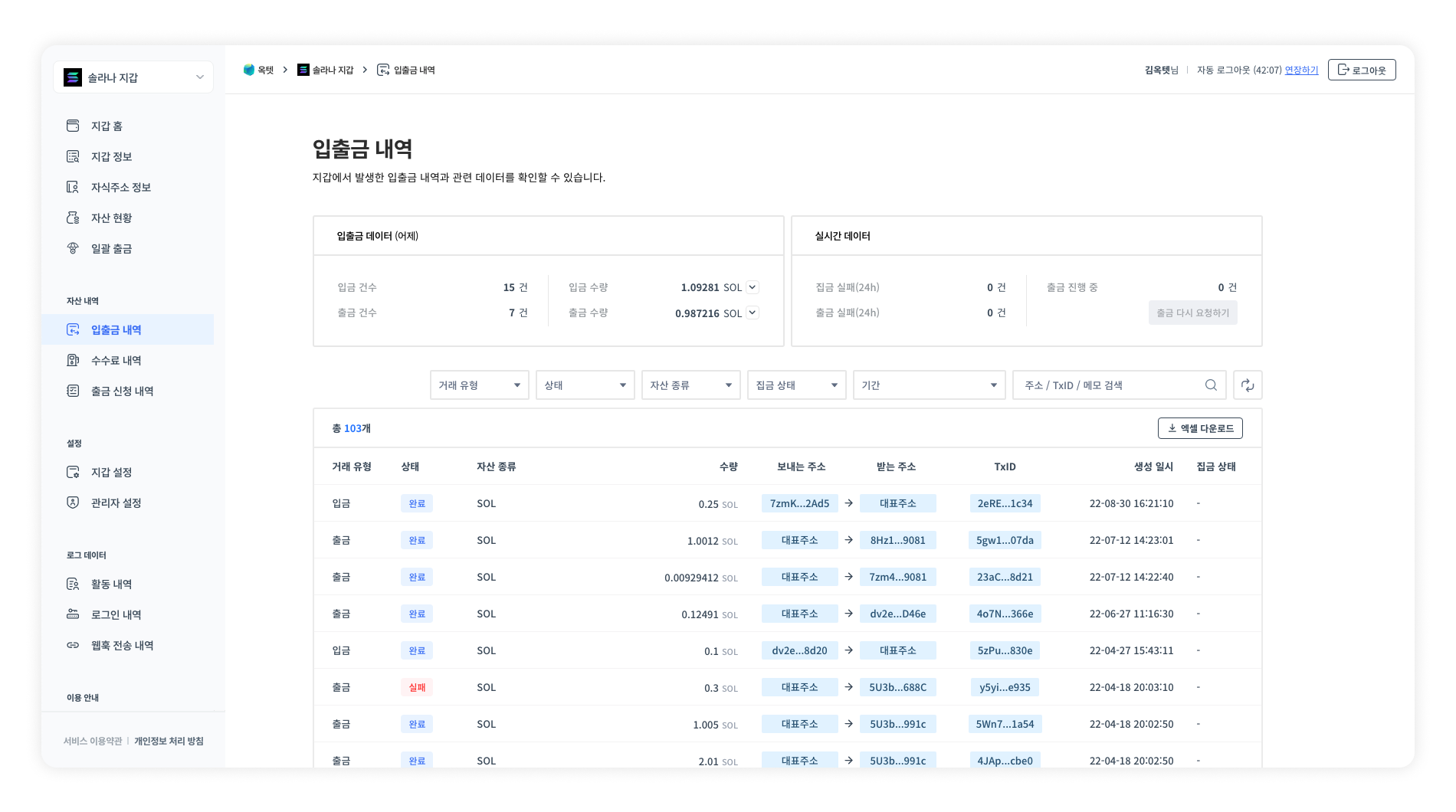
You can check the deposit history in [Transactions] on the console. Deposits in UNFINALIZED status are displayed as 'In progress', and deposits in FINALIZED status are displayed as 'Completed'.
2. Checking with webhooks
When a deposit to the main address or a child address is completed, a deposit webhook is sent. You can check whether a deposit has occurred from the received webhook. For how to use webhooks and the format of the data sent, refer to the Webhook page.
Building a gathering system
Gathering
Transfers assets stored in child addresses to the main wallet. You can gather in one of the following two ways.
1. Gathering from the console
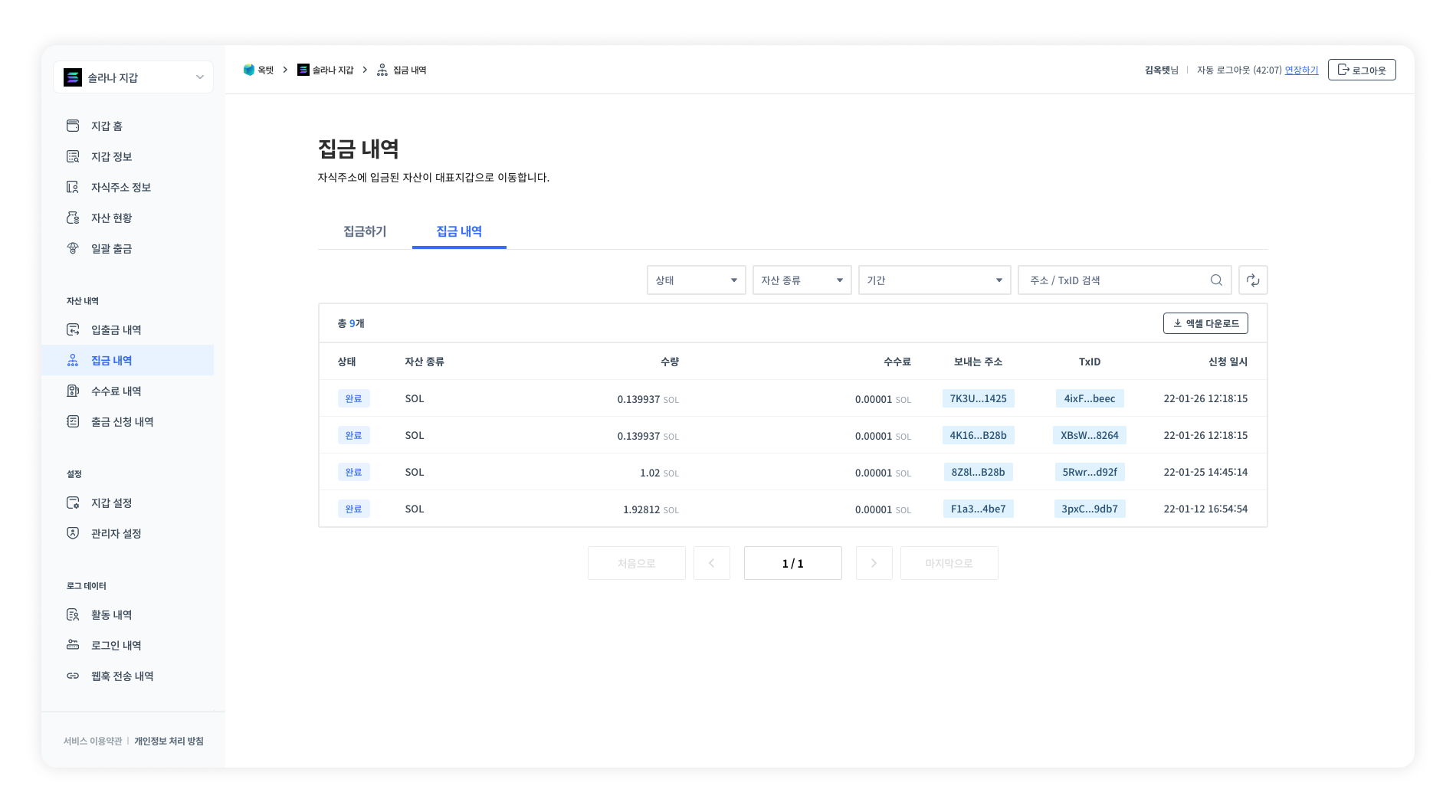
You can gather from Console - Select a wallet - [Gathering History]. Click the [Gather] button, check the assets and the amount to gather, then proceed with the gathering.
2. Gathering with the API
The gathering proceeds when you call the Request Gathering API.
Response example
[
  {
    "success": true,
    "uuid": "97410344-a48b-4f7e-a1ee-2feff91bebaa",
    "childAddresses": [
      "0x42d0aAE9A2305D66d20bE4361535FdB44670F933"
    ]
  },
  {
    "success": false,
    "childAddresses": [
      "0x94c1e678705cA8FB2d5929B37d01aAb14ffA9D7d"
    ],
    "errorCode": "ERR_0420002",
    "errorMessage": "The amount to be gathered is less than the minimum amount to be gathered."
  }
]
Managing gathering fees
When gathering coins, the fee is deducted from the assets to be gathered. When gathering tokens, on the other hand, coins to pay the fee must be injected first. In this case, the fee address injects coins equal to the fee. Therefore, you must check the balance of the fee address before gathering.
The gathering method may vary depending on the platform, so refer to the detailed guide for each platform.
Checking gatherings
1. Checking from the console
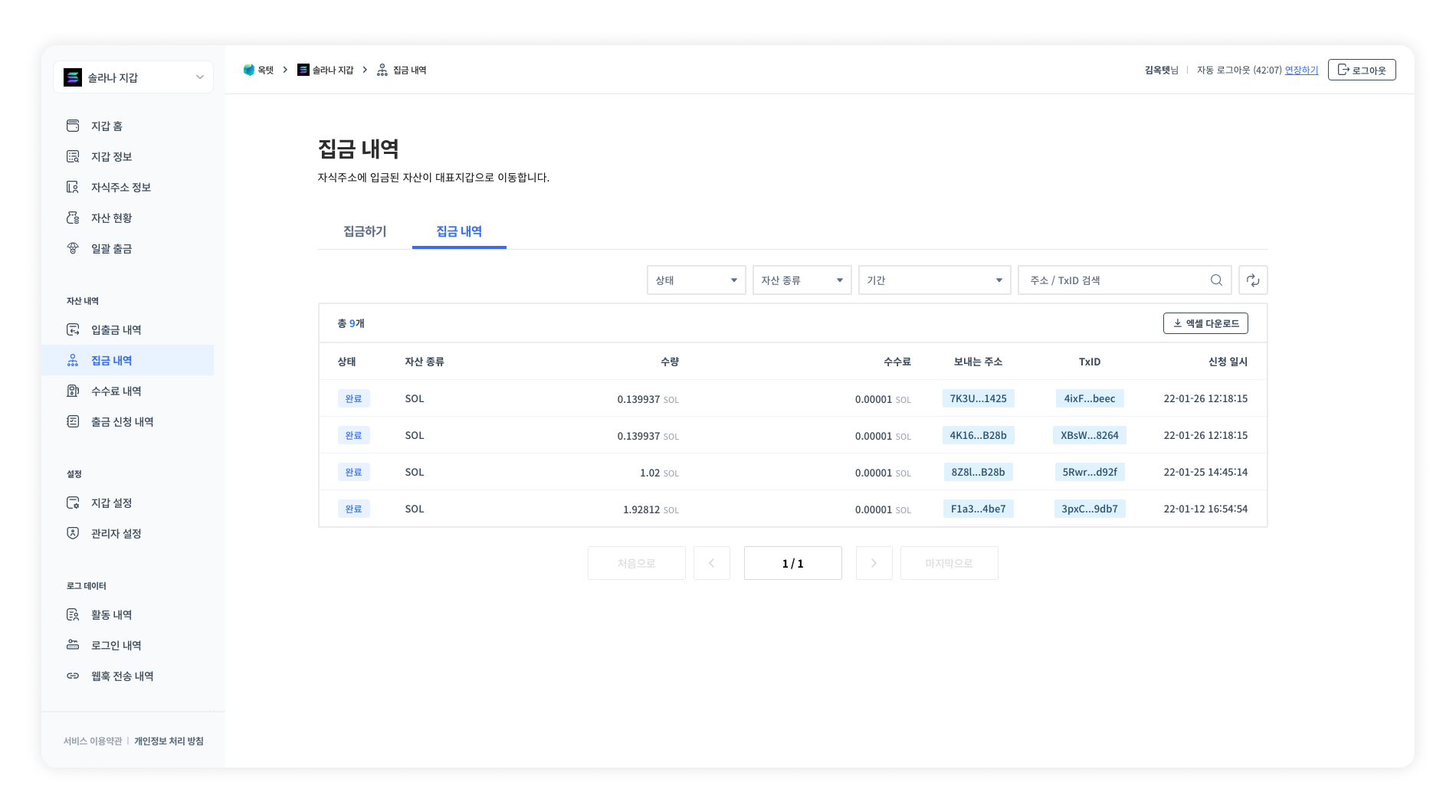
You can check the gathering history in Select a wallet - [Gathering History] - [Gathering History].
2. Checking with the API
You can check the progress of a specific gathering transaction by calling the Get Gathering Request Information API.
Response example
{
  "idx": 75,
  "status": "COMPLETED",
  "uuid": "061c3807-704a-477e-8a69-21bbfb71b16f",
  "createdDate": "2022-01-03T09:50:40.371Z",
  "modifiedDate": "2022-01-03T09:52:00.000Z",
  "coin": {
    "idx": 2,
    "symbol": "KAIA",
    "nameKo": "Kaia",
    "nameEn": "Kaia",
    "status": "ACTIVATED",
    "type": "DEFAULT",
    "contractAddress": null,
    "decimals": 18,
    "createdDate": "2021-09-20T07:41:22.042Z",
    "modifiedDate": "2021-12-23T07:07:48.272Z"
  },
  "feeInjectionTransaction": null,
  "feeInjectionFee": null,
  "gatheringTransaction": {
    "idx": 9013,
    "uuid": "78ac42ae-1624-48e1-a22e-b9f74a627934",
    "type": "GATHERING",
    "txid": "0xf51f75ca0276877d851af598d92e8bdab4d99d034b8c11ee967eaf38aad5f179",
    "fromAddress": "0x61Cb7bbc6Ca8FF2502ad7163059E57e962a1776B",
    "toAddress": "0x71b5De2970A32eEf6362AE7Bc3B73103b4392bB0",
    "amount": "0.00003700000000000000",
    "usedFee": "0.00002100000014700000",
    "nonce": 0,
    "blockHeight": "6135121",
    "serialized": null,
    "memo": null,
    "status": "FINALIZED",
    "outputIndex": null,
    "createdDate": "2022-01-03T09:51:00.797Z",
    "modifiedDate": "2022-01-03T09:52:00.000Z",
    "unfinalizedDate": "2022-01-03T09:52:00.000Z",
    "finalizedDate": "2022-01-03T09:52:00.000Z",
    "failedDate": null,
    "coin": {
      "idx": 2,
      "symbol": "KAIA",
      "nameKo": "Kaia",
      "nameEn": "Kaia",
      "status": "ACTIVATED",
      "type": "DEFAULT",
      "contractAddress": null,
      "decimals": 18,
      "createdDate": "2021-09-20T07:41:22.042Z",
      "modifiedDate": "2021-12-23T07:07:48.272Z"
    }
  },
  "gatheringFee": {
    "idx": 184,
    "gasLimit": "21000.00000000000000000000",
    "gasPrice": "2.00000000000000000000",
    "unit": "gwei",
    "createdDate": "2022-01-03T09:50:40.369Z",
    "modifiedDate": "2022-01-03T09:50:40.369Z"
  }
}
3. Checking with webhooks
When the gathering to the main address is completed, a gathering webhook is sent. You can check whether the gathering has occurred from the received webhook. For how to use webhooks and the format of the data sent, refer to the Webhook page.
Building a withdrawal system
Withdrawing
To send assets from a centralized wallet to the outside, you must withdraw from the main address. Assets cannot be withdrawn to the outside from child addresses. You can withdraw by calling the withdrawal API or by requesting a withdrawal from the console. If necessary, you can set withdrawals to proceed only after administrator approval.
- Request a withdrawal.
- A transaction is created.
- The optimal fee is calculated and the transaction is propagated.
- The withdrawal is completed when the transaction is included in a block.
1. Withdrawing from the console
When withdrawing from the console, you can withdraw only from the main address. If the key management type is co-managed, you need to generate a one-time user key to request a withdrawal from the console. For details on how to withdraw from the console, refer to the console withdrawal guide.
2. Withdrawing with the API
You can request a withdrawal from the main address to the outside by calling the Request Withdrawal API. If the withdrawal request succeeds, a uuid value is returned. You can use this value to check the progress of the withdrawal.
Response example
{
  "uuid": "18012e3f-07f3-45ec-862b-f020c0ca935a"
}
Setting up withdrawal approval
By default, all withdrawals proceed after administrator approval. However, this setting can be disabled for API withdrawals, in which case the withdrawal proceeds immediately upon request.
- API withdrawal - You can disable administrator approval in [Wallet Settings] - [API Withdrawal Approval].
- Console withdrawal - Administrator approval is required.
Checking withdrawals
1. Checking from the console
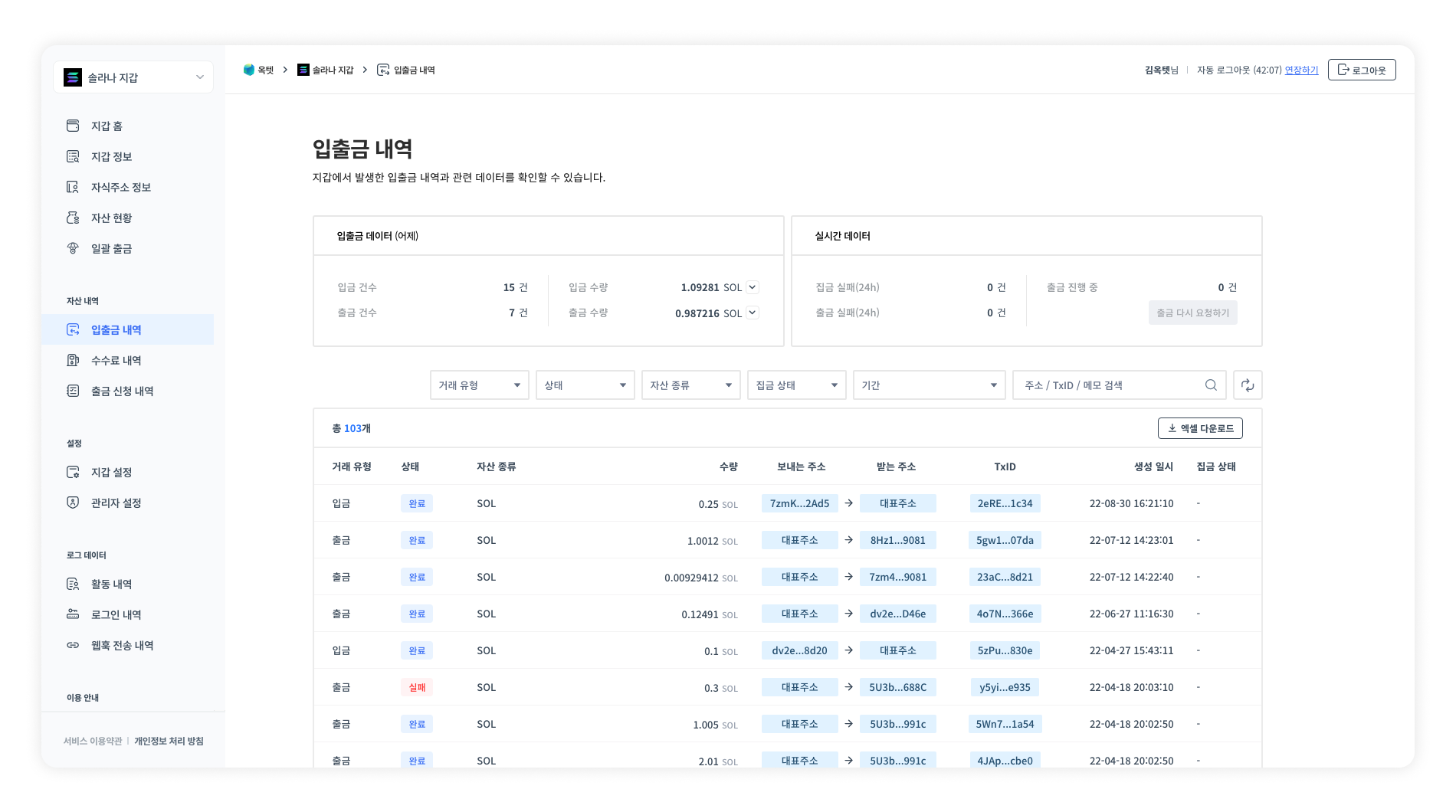
You can check the withdrawal history in [Transactions] on the console. Withdrawals in AWAITING_WITHDRAWAL or PENDING status are displayed as 'In progress', and withdrawals in FINALIZED status are displayed as 'Completed'.
2. Checking with the API
You can check the progress of a specific withdrawal transaction by calling the Get Withdrawal Request Information API.
Response example
{
  "idx": 490,
  "uuid": "07efdcb2-b3fd-4fe7-bf47-c0b460b289e3",
  "fromAddress": "0x71b5De2970A32eEf6362AE7Bc3B73103b4392bB0",
  "toAddress": "0x295909dC67B76f936BD4119aDd877088602cCaD3",
  "amount": "2.00000000000000000000",
  "memo": null,
  "requestId": "25",
  "type": "API",
  "description": "",
  "requiredApprovalCount": 1,
  "useApiAutoApproval": true,
  "status": "SENT",
  "createdDate": "2022-01-25T09:25:02.383Z",
  "modifiedDate": "2022-01-25T09:25:10.000Z",
  "rejectedDate": null
}
3. Checking with webhooks
When a withdrawal from the main address to the outside is completed, a withdrawal webhook is sent. You can check whether the withdrawal has occurred from the received webhook. For how to use webhooks and the format of the data sent, refer to the Webhook page.
2. Building a child address withdrawal wallet
Generally, a child address withdrawal wallet is built as follows. Other features can be implemented in various ways depending on the type of service.
Building a child address system
Creating child addresses
Create addresses to be issued to end users. Generally, one child address is issued to each end user. Child addresses are created by calling the API, and the list of issued child addresses can be checked from the console.
Managing child address balances
You can check the balance of each child address by calling the Get Address Balance API.
Most platforms have the same child address structure, but it may vary depending on the platform, so refer to the detailed guide for each platform.
Building a deposit system
Adding tokens
Octet processes deposits only for registered tokens. Therefore, you must add a token to the wallet before depositing it.
- You can add tokens in [Wallet Settings] - [Token Management].
- If the token you want is not in the list, you can request a new token on the [Request New Token Registration] page at the top right.
Checking for deposits
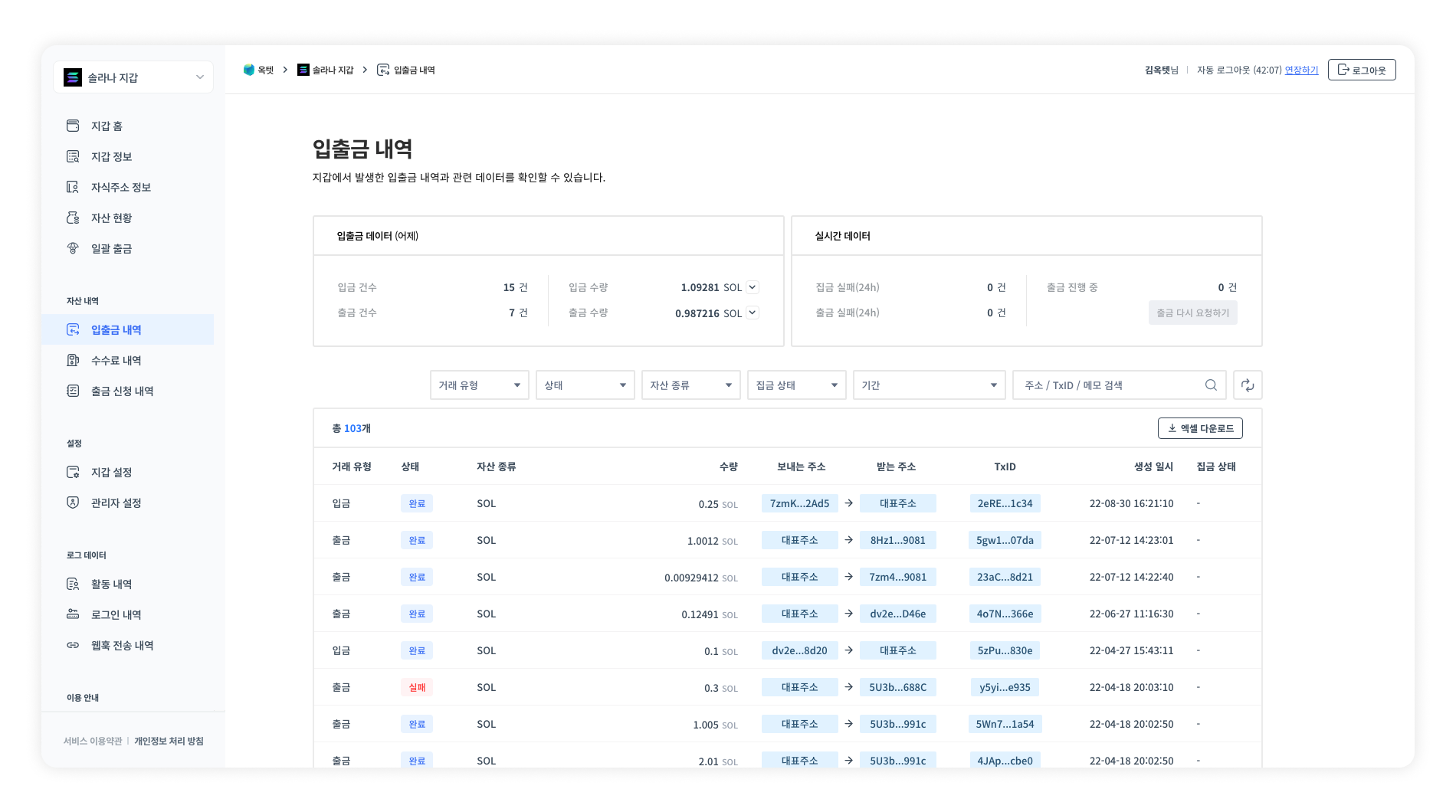
1. Checking from the console
You can check the deposit history in [Transactions] on the console. Deposits in UNFINALIZED status are displayed as 'In progress', and deposits in FINALIZED status are displayed as 'Completed'.
2. Checking with webhooks
When a deposit to the main address or a child address is completed, a deposit webhook is sent. You can check whether a deposit has occurred from the received webhook. For how to use webhooks and the format of the data sent, refer to the Webhook page.
Building a withdrawal system
Withdrawing from child addresses
Withdraws assets stored in child addresses to the outside. You can request a withdrawal by calling the Child Address Withdrawal Request API.
Withdrawing from the main address
Withdraws assets stored in the main address to the outside. You can request a withdrawal by calling the Request Withdrawal API or from the console.
Setting up withdrawal approval
By default, all withdrawals proceed after administrator approval. However, this setting can be disabled for API withdrawals, in which case the withdrawal proceeds immediately upon request.
- API withdrawal - Administrator approval can be disabled.
- Console withdrawal - Administrator approval is required.
Withdrawing
You can request a withdrawal from the main address to the outside by calling the Request Withdrawal API. If the withdrawal request succeeds, a uuid value is returned. You can use this value to check the progress of the withdrawal.
Response example
{
  "uuid": "18012e3f-07f3-45ec-862b-f020c0ca935a"
}
Checking withdrawal completion
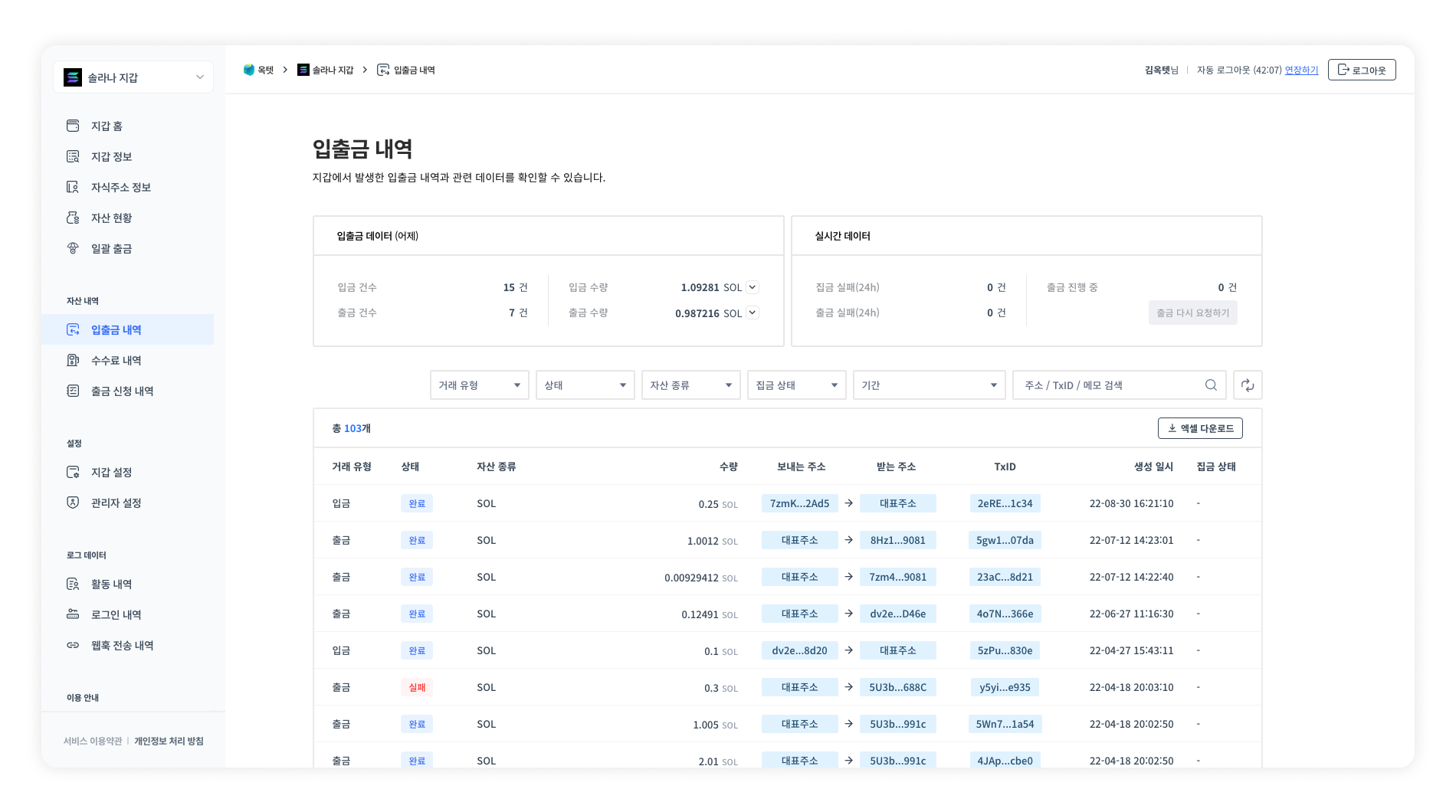
1. Checking from the console
You can check the withdrawal history in [Transactions] on the console. Withdrawals in AWAITING_WITHDRAWAL or PENDING status are displayed as 'In progress', and withdrawals in FINALIZED status are displayed as 'Completed'.
2. Checking with the API
You can check the progress of a specific withdrawal transaction by calling the Get Withdrawal Request Information API.
Response example
{
  "idx": 490,
  "uuid": "07efdcb2-b3fd-4fe7-bf47-c0b460b289e3",
  "fromAddress": "0x71b5De2970A32eEf6362AE7Bc3B73103b4392bB0",
  "toAddress": "0x295909dC67B76f936BD4119aDd877088602cCaD3",
  "amount": "2.00000000000000000000",
  "memo": null,
  "requestId": "25",
  "type": "API",
  "description": "",
  "requiredApprovalCount": 1,
  "useApiAutoApproval": true,
  "status": "SENT",
  "createdDate": "2022-01-25T09:25:02.383Z",
  "modifiedDate": "2022-01-25T09:25:10.000Z",
  "rejectedDate": null
}
3. Checking with webhooks
When a withdrawal from the main address to the outside is completed, a withdrawal webhook is sent. You can check whether the withdrawal has occurred from the received webhook. For how to use webhooks and the format of the data sent, refer to the Webhook page.