Sign with an MPC Key
A withdrawal from an MPC wallet goes through a process in which the User Key Share held by the end user and the Octet Key Share held by Octet are combined to generate a signature.
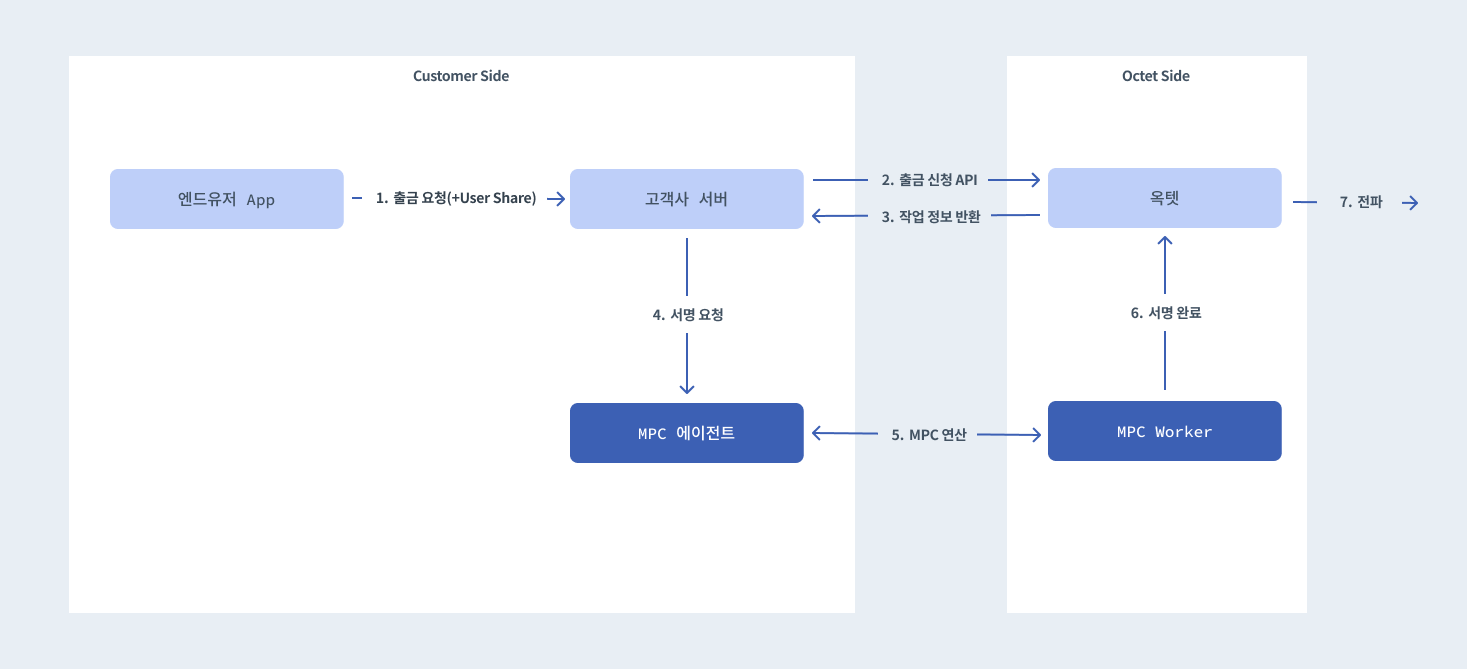
Signing and withdrawal flow
- Create the transaction: The client creates the unsigned transaction data directly.
- Request a withdrawal from Octet: Request a withdrawal through the Octet API and receive the signing task information.
- Sign with the MPC agent: Generate the signature in the MPC agent using the end user's User Key Share and the task information from Octet.
- Broadcast the transaction: Once signing is complete, Octet automatically assembles the final transaction and broadcasts it to the blockchain.
Detailed steps
Step 1: Prepare the withdrawal request
When withdrawing from an MPC address, you must include the following two settings.
autoSigning:false(required, since Octet cannot sign alone)serializedUnsignedTransaction: The unsigned transaction data created directly by the client (hex string)
Step 2: Request a withdrawal from Octet
Call the withdrawal request API.
- Response: On success, the response object includes an
mpcfield.
{
  "uuid": "...",
  "mpc": {
    "unsignedTransactionHash": "2c745b3cd5af47515df7bded000d1906147e27c275a3029cc6d4a585aa1c47b0",
    "token": "eyJhbGciOiJIUzI1NiIsInR5cCI6IkpXVCJ9..."
  }
}
Step 3: Request a signature from the MPC agent
Request a signature from the agent using the User Key Share received from the end user and the mpc information received in step 2.
- Required input: User Key Share,
unsignedTransactionHash,token - Behavior: The agent works with the Octet MPC Worker to generate a 2-of-3 signature.
Step 4: Complete the withdrawal
- When the signing computation completes successfully in the MPC agent, the Octet system detects it and combines the previously delivered
serializedUnsignedTransactionwith the generated signature. - The final signed transaction (
serializedSignedTransaction) is produced, and Octet broadcasts it to the blockchain network.