Agent Integration
1. Agent method overview
The agent method is an integration method in which the MPC agent program provided by Octet is installed and operated on the client server. MPC key creation and signing computations are performed by the agent inside the client infrastructure, and the end user stores the User Share directly.
System architecture
- End user (App): After requesting key creation from the client, stores the received key and passes the stored key to the client when requesting a signature.
- Client server (Client): Acts as a relay between the end user and Octet, and manages the MPC agent.
- MPC agent: Installed inside the client server; creates the end user's key shares and performs signing computations.
- Octet: Performs Octet's side of the MPC computation for key creation and signing requests, handles errors, and performs post-processing on success.
MPC agent availability
Currently, the agent method of Octet's MPC solution is provided as an agent installed on the client server. For the agent program and installation guidance needed to follow this guide, contact us below.
- Email: octet.team@walletone.io
2. MPC key creation guide
MPC keys are created per client (Company), and a created key can be linked when creating child addresses in a wallet.
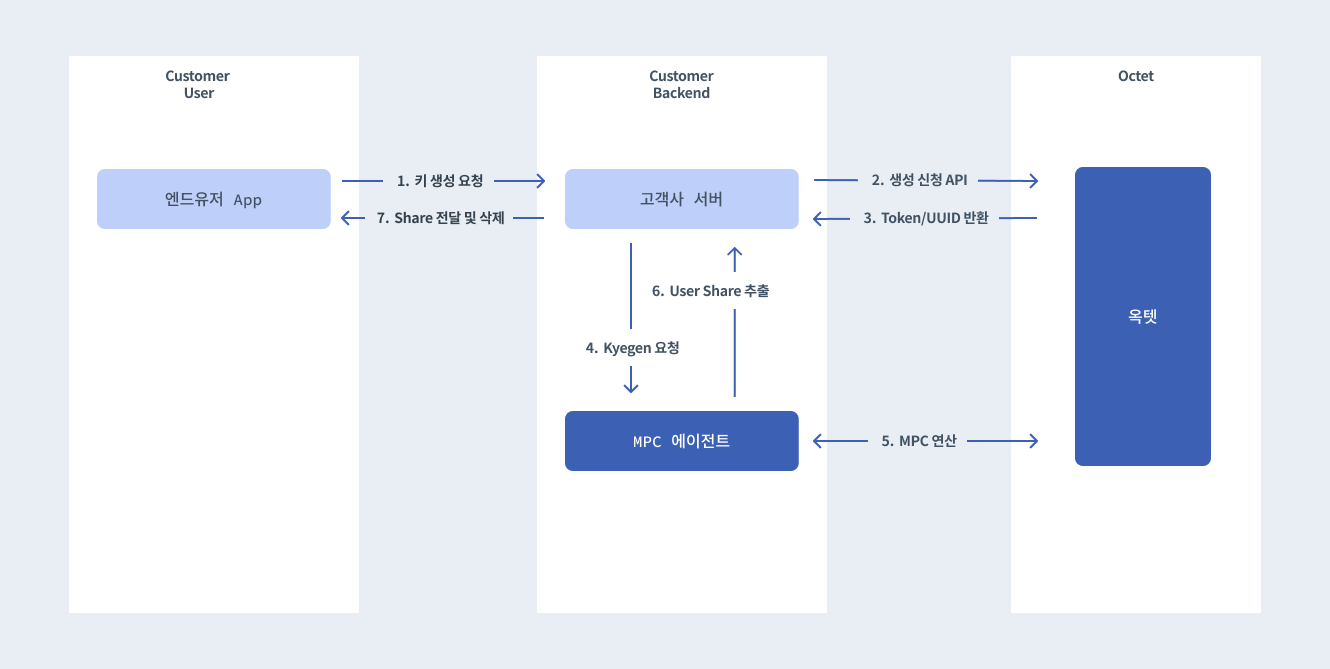
Key creation flow
- Request MPC key creation: The client calls the Octet API to request a key creation job and receives an authentication token.
- Request key creation from the MPC agent: Using the issued token and UUID, the MPC agent inside the client infrastructure starts the actual key creation computation.
- Extract and deliver the User Share: After the computation completes, retrieve the User Share created by the MPC agent and deliver it securely to the end user.
- Delete the share from the agent: For security, delete the User Share temporarily stored in the agent.
Detailed steps
Step 1: Request key creation from Octet
Call the Request MPC Key Creation API.
- Response:
uuid(unique job ID),token(JWT for MPC agent authentication),expiredDate(expiration time of the request) - Validity period: If key creation is not completed within 2 minutes (120 seconds; the exact time is the
expiredDatein the response) of the request, the request expires (EXPIRED). An expired request cannot be reused, and you must request key creation again.
Step 2: Request the job from the MPC agent
Send a request to the MPC agent inside the client using the information received in Step 1.
- Job: Key Shares are created in a distributed way through communication between the MPC agent and Octet.
Step 3: Deliver and manage the User Share
- Retrieve the key: Fetch the created User Share through the MPC agent's retrieval API.
- Deliver the key: Deliver the fetched User Share to the end user.
- Delete from the agent: Once delivery is complete, call the agent's delete API to erase the User Share remaining on the client server.
Step 4: Check the status
The progress or final result of the key creation computation can be checked through the Octet API.
- Check creation status: Get MPC Key Creation Request request
- The status ends in one of
SUCCESS/FAILED/EXPIREDfromAWAITING_CREATION.EXPIREDmeans the request expired because key creation was not completed within the validity period.
- The status ends in one of
- Get final key info: Get MPC key (includes public key information, etc.)
Linking the MPC key when creating a child address
Once MPC key creation is complete, you can create addresses in the wallet that use that key.
- How: When calling the create child address API, enter the
uuidof the key created above in thempcKeyUuidfield. - All withdrawals, transaction signings, and data signings from this address will require the signature of that MPC key.
3. MPC key signing guide
Signatures for MPC addresses are produced by combining the key share held by the end user with the key share held by Octet. The three APIs that require signing — withdrawal request, transaction signing request, and data signing request — all work the same way, and the description below is based on withdrawals. The differences for the other two APIs are summarized in the "Transaction signing and data signing APIs" section at the end of this chapter.
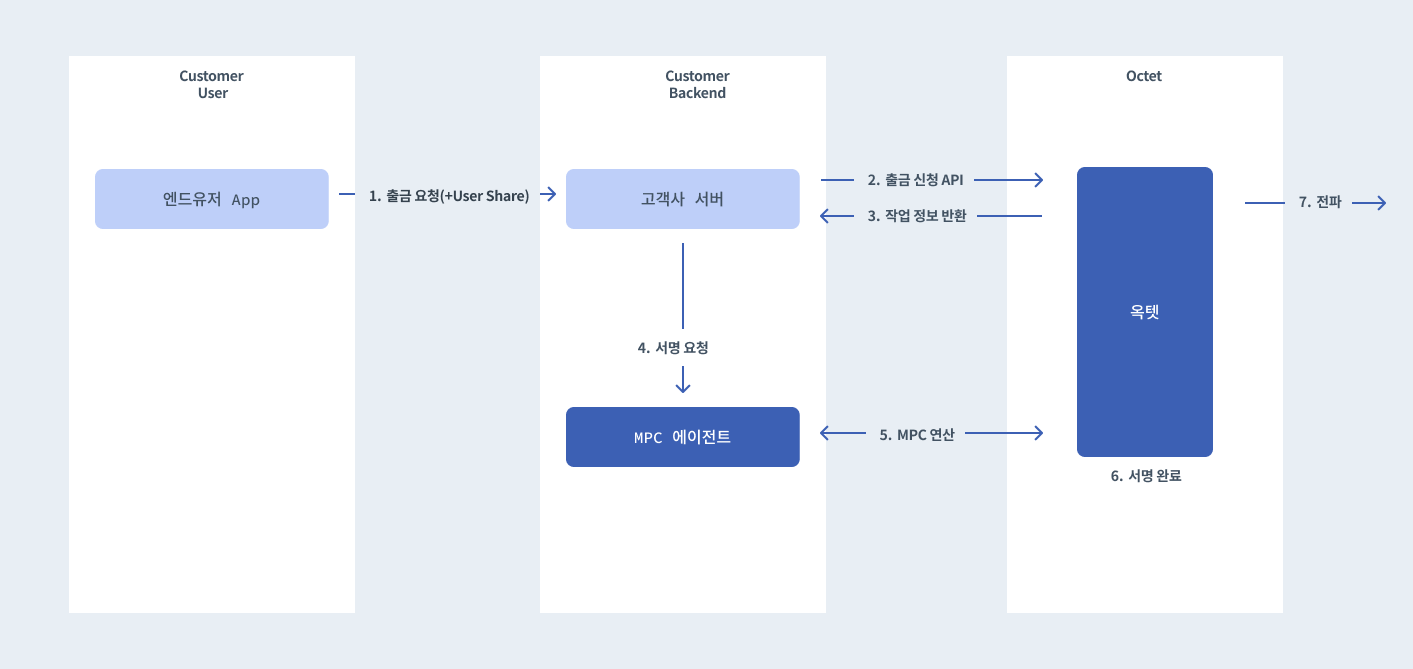
Signing and withdrawal flow
- Create the transaction: The client creates the unsigned transaction data directly.
- Request a withdrawal from Octet: Request a withdrawal through the Octet API and receive the signing job information.
- Sign with the MPC agent: The MPC agent produces the signature using the end user's User Share and Octet's job information.
- Broadcast the transaction: When signing is complete, Octet automatically assembles the final transaction and broadcasts it to the blockchain.
Detailed steps
Step 1: Prepare the withdrawal request
When withdrawing from an MPC address, the following two settings must be included.
autoSigning:false(required, since Octet cannot sign alone)serializedUnsignedTransaction: The unsigned transaction data created directly by the client (Hex String)
Step 2: Request a withdrawal from Octet
Call the Withdrawal request API.
- Response: On success, the response object includes an
mpcfield. The signing targets are returned as thempcSigningTargetsarray; a single signature (EVM, etc.) is also an array with one element. Assets that require a signature per transaction input, such as Bitcoin, have multiple elements.
{
  "uuid": "...",
  "mpc": {
    "token": "eyJhbGciOiJIUzI1NiIsInR5cCI6IkpXVCJ9...",
    "expiredDate": "2026-07-29T00:02:00.000Z",
    "mpcSigningTargets": [
      {
        "signingIndex": 0,
        "message": "2c745b3cd5af47515df7bded000d1906147e27c275a3029cc6d4a585aa1c47b0"
      }
    ]
  }
}
- Validity period: If MPC signing is not completed within 2 minutes (120 seconds; the exact time is
mpc.expiredDate) of the request, the signing request expires (EXPIRED) and the withdrawal is automatically marked as failed (FAILED). It is marked as failed without a separate withdrawal cancellation request, so if you need to retry, request a new withdrawal. - Withdrawal restriction during Refresh: If there is a Refresh request in progress for that MPC key, the withdrawal request is rejected. You can request again after the Refresh has ended (success/failure/expiration).
Step 3: Request signing from the MPC agent
Request signing from the agent using the User Share received from the end user and the mpc information received in Step 2.
- Required input: User Share,
token,mpcSigningTargets- Pass the
mpcSigningTargetsarray from the Step 2 response exactly as is, in order and value, converting only the field names to snake_case (signingIndex→signing_index;messagestays the same). If you alter the values, the job is rejected in the cross-check against the signing targets recorded in Octet.
- Pass the
- Behavior: The agent works with Octet to produce a 2-of-3 signature. A transaction with multiple signing targets is also accepted in a single call and processed sequentially within one session.
Step 4: Complete the withdrawal
- When the signing computation completes successfully in the MPC agent, the Octet system detects it and combines the previously received
serializedUnsignedTransactionwith the produced signature. - The final signed transaction (
serializedSignedTransaction) is built, and Octet broadcasts it to the blockchain network. - The signing progress can be checked through
mpcSigning.statusin the response of the get withdrawal request API; it ends in one ofSUCCESS/FAILED/EXPIREDfromAWAITING_SIGNING.
Transaction signing and data signing APIs
The signing flow above applies in the same way to the Sign transaction and Sign data APIs, in addition to withdrawals. Only the request API and the processing after signing differ; the mpc format in the response and Step 3 (requesting signing from the MPC agent) are exactly the same.
| Withdrawal request | Transaction signing request | Data signing request | |
|---|---|---|---|
| Request input | serializedUnsignedTransaction + autoSigning: false | serializedUnsignedTransaction | The data to sign and its type (EIP191 / EIP712 / KIP97) |
Signing target message | Transaction signing hash | Transaction signing hash | Data hash computed by Octet |
| After signing | Octet assembles the signed transaction and also broadcasts it to the blockchain | Octet assembles and stores the signed transaction (serializedSignedTransaction); the client broadcasts it with the Send signed transaction API | Octet stores the signing result (serializedSignedData) |
| Checking the result | Get withdrawal request API | Get transaction signing request API | Get data signing request API |
- The validity period (2 minutes), the handling of
EXPIRED→ request failure (FAILED) on expiration, and the request restriction during Refresh apply equally to all three APIs. - For data signing, Octet computes the hash to sign and returns it as
messageinmpcSigningTargetsof the response, so the client only needs to submit the original data. The signing resultserializedSignedDatais the RLP encoding of the 65-byte signature (r ‖ s ‖ v, v = 27 + recovery id).
4. MPC key Refresh guide (reissue)
Refresh is a feature that reissues every party's key shares as a new version when the end user has lost their User Share. The reissue computation is performed with only the two key shares held by Octet, so there is no need to submit the existing User Share when requesting.
- Public key, address, and key UUID preserved: Only the key's
versionincreases by 1; previously created addresses and assets are not affected. - Previous key shares invalidated: Once the Refresh succeeds, the previous version's combination of key shares can no longer produce a valid signature. You must deliver the new User Share to the end user.
Refresh flow
- Request a Refresh: The client calls the Octet API to request a Refresh job and receives an authentication token.
- Request the Refresh from the MPC agent: Using the issued token and UUID, the MPC agent inside the client infrastructure starts the reissue computation.
- Check the status: Call the Octet API to check whether the request status has become
SUCCESS. - Extract and deliver the User Share: Retrieve the newly issued User Share from the MPC agent, deliver it securely to the end user, and delete the User Share temporarily stored in the agent.
Detailed steps
Step 1: Request a Refresh from Octet
Call the Request MPC Key Creation Refresh API.
- Request:
mpcKeyUuid(UUID of the MPC key to reissue) - Response:
uuid(unique ID of the Refresh request),token(JWT for MPC agent authentication),expiredDate(expiration time of the request)- The
uuidin the response is the UUID of the Refresh request, which differs from the MPC key's UUID. It is used to check the request status, not to retrieve the key share from the agent.
- The
- Validity period: If the Refresh is not completed within 2 minutes (120 seconds; the exact time is the
expiredDatein the response) of the request, the request expires (EXPIRED). In this case the key version is kept as is, and you must request a new Refresh.
Step 2: Request the job from the MPC agent
Send a request to the MPC agent inside the client using the information received in Step 1.
- Job: Every party's Key Share is regenerated as a new version through communication between the MPC agent and Octet. The existing User Share is not required.
Step 3: Check the status
- Check request status: Get MPC key Refresh request
- The status ends in one of
SUCCESS/FAILED/EXPIREDfromAWAITING_REFRESH. SUCCESS: Reissue complete. The key is replaced with thetoVersionversion fixed at request time.FAILED: Reissue failed. CheckerrorCode/errorMessage, then you can request again.EXPIRED: Expired because it was not completed within the validity period.
- The status ends in one of
- Request history: Get MPC key Refresh requests (supports the
mpcKeyUuidfilter)
Step 4: Deliver and manage the User Share
- Retrieve the key: After confirming that the status is
SUCCESS, fetch the newly issued User Share by key UUID through the MPC agent's retrieval API. This is the same as for key creation. - Deliver the key: Deliver the fetched User Share to the end user. The previous User Share can no longer be used.
- Delete from the agent: Once delivery is complete, we recommend calling the agent's delete API to delete the User Share remaining on the client server.
Notes
- Prerequisites: The target MPC key must be in the
ACTIVATEDstate, and there must be no signing in progress (withdrawal, transaction signing, data signing) or other Refresh request for that key. A session in progress expires automatically once its expiration time passes.