End-to-End Encryption
When using the Octet API, Octet provides two-way end-to-end encryption based on RSA public keys for additional security between the sending and retrieving ends. Octet and the client each hold an RSA key pair. When sending sensitive information to Octet, you encrypt it with Octet's RSA public key and send it, and Octet decrypts it with Octet's RSA private key. When retrieving sensitive information stored in Octet, the information is returned encrypted with the client's RSA public key. You decrypt it with the client's RSA private key.
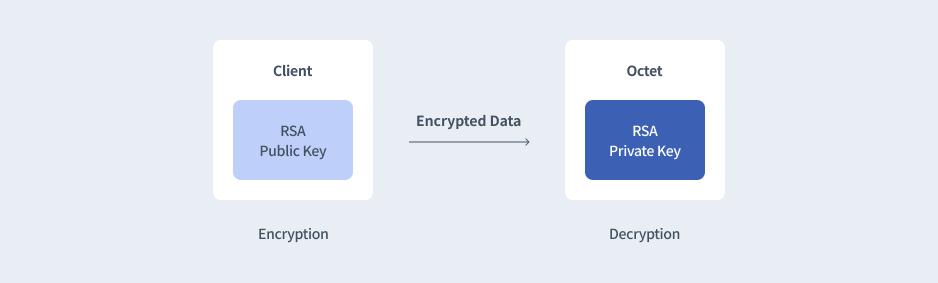
Octet RSA key
The RSA key pair required for encryption is generated automatically when the Owner account is created. The Octet RSA public key to be used by the client can be found on the Developer Tools page of the Octet console.
Client RSA key
To retrieve sensitive information such as child address keys, the client's RSA public key must be registered. The client can generate an RSA key pair and register the public key through the Octet Help Center.
# Generate the private key
openssl genpkey -algorithm RSA -pkeyopt rsa_keygen_bits:3072 -out client_private_key.pem

# Generate the public key
openssl rsa -pubout -in private_key.pem -out client_public_key.pem
Key length - 3,072
Format - PKCS#8
Encoding - PEM
Encryption target when sending
Among the multisig keys, the user key must be encrypted. When you call the API with the encryption result in the encryptedUserKey field of the Request Body, the Octet server uses the decrypted result of that value when signing.
Encryption target when retrieving
In the key retrieval request info API, the requested key value is stored encrypted in the secret field. You can decrypt that value with the client's RSA private key.
Encrypting
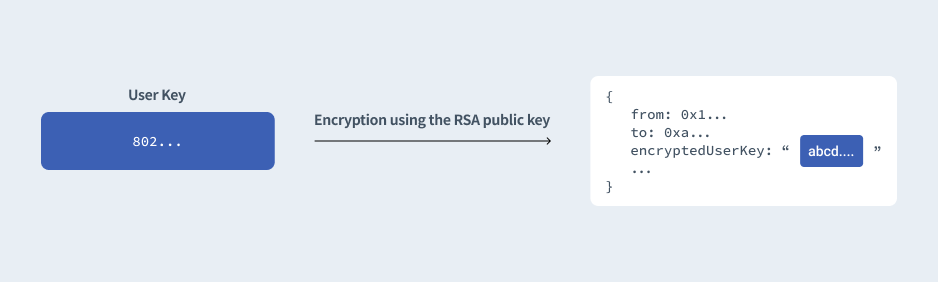
Encryption padding - OAEPWithSHA1AndMGF1Padding
Decrypting
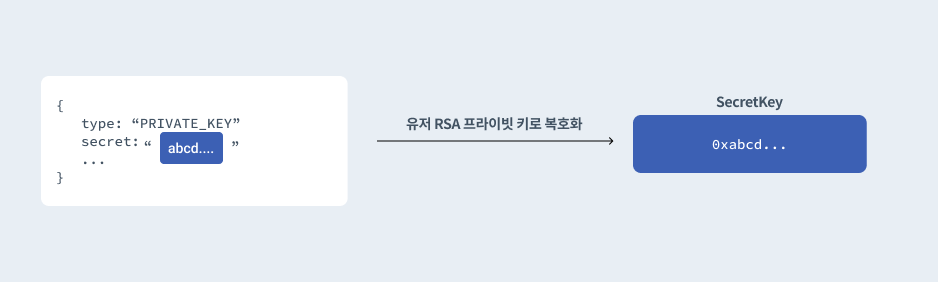
Encryption sample code
Sample code, by language, for the encryption using the RSA public key that the client must perform.
node.js
const { readFileSync } = require('fs');
const { publicEncrypt } = require('crypto');

const publicKeyFilePath = '/Users/sam/Downloads/octet-rsa-public-key.pem';
const multisigKey = '801... or 802...';

const publicKey = readFileSync(publicKeyFilePath);
const bodyBuffer = Buffer.from(multisigKey);

const encryptedMessage = publicEncrypt(publicKey, bodyBuffer).toString('base64');
console.log(encryptedMessage);
java 8 or higher
/*
 * This Java source file was generated by the Gradle 'init' task.
 */
package EncryptBody;

import java.io.FileInputStream;
import java.io.FileNotFoundException;
import java.io.IOException;
import java.security.GeneralSecurityException;
import java.security.KeyFactory;
import java.security.interfaces.RSAPublicKey;
import java.security.spec.X509EncodedKeySpec;
import java.util.Base64;
import java.util.Scanner;

import javax.crypto.Cipher;

public class App {
    private static String readPemFile(String filePath) {
        StringBuffer sb = null;

        try (
            FileInputStream is = new FileInputStream(filePath);
            Scanner sc = new Scanner(is, "UTF-8");
        ) {
            sb = new StringBuffer();

            while (sc.hasNextLine()) {
                sb.append(sc.nextLine());
            }
            if (sc.ioException() != null) {
                throw sc.ioException();
            }
        } catch(FileNotFoundException e) {
            System.err.println("File not found");
        } catch (SecurityException e) {
            e.printStackTrace();
        } catch (IOException e) {
            e.printStackTrace();
        }

        String result = sb.toString()
            .replace("-----BEGIN PUBLIC KEY-----", "")
            .replace("-----END PUBLIC KEY-----", "");
        sb.setLength(0);
        return result;
    }

    private static RSAPublicKey getPublicKey(String pem) {
        byte[] decoded = null;
        KeyFactory kf = null;
        RSAPublicKey publicKey = null;

        try {
            decoded = Base64.getDecoder().decode(pem);
            kf = KeyFactory.getInstance("RSA");
            publicKey = (RSAPublicKey) kf.generatePublic(new X509EncodedKeySpec(decoded));
        } catch (IllegalArgumentException e) {
            System.err.println("Invalid pem file");
            e.printStackTrace();
        } catch (GeneralSecurityException e) {
            System.err.println("PublicKey generation failed");
            e.printStackTrace();
        }

        return publicKey;
    }

    private static String encrypt(String plainText, RSAPublicKey publicKey) {
        String result = null;

        try {
            Cipher cipher = Cipher.getInstance("RSA/ECB/OAEPWithSHA1AndMGF1Padding");
            cipher.init(Cipher.ENCRYPT_MODE, publicKey);
            result = Base64.getEncoder().encodeToString(cipher.doFinal(plainText.getBytes()));
        } catch (GeneralSecurityException e) {
            System.err.println("PublicKey encryption failed");
            e.printStackTrace();
        }

        return result;
    }

    public static void main(String[] args) {
        String publicKeyFilePath = "/Users/sam/Downloads/octet-rsa-public-key.pem";
        String multisigKey = "801... or 802...";

        String pem = readPemFile(publicKeyFilePath);
        RSAPublicKey publicKey = getPublicKey(pem);

        String encrypted = encrypt(multisigKey, publicKey);
        System.out.println(encrypted);
    }
}
C#
using System.Security.Cryptography;
using System.Text;

string publicKeyFilePath = "/Users/sam/Downloads/octet-rsa-public-key.pem";
string multisigKey = "801... or 802...";

RSACryptoServiceProvider rsa = new();
rsa.ImportFromPem(File.ReadAllText(publicKeyFilePath));

byte[] encrypted = rsa.Encrypt(Encoding.UTF8.GetBytes(multisigKey), true);
Console.WriteLine(Convert.ToBase64String(encrypted));
Python 3
#
# pip3 install pycryptodome
#

from Crypto.PublicKey import RSA
from Crypto.Cipher import PKCS1_OAEP
import base64

def readPemFile(file_path) :
  file = open(file_path)
  key = RSA.importKey(file.read())
  file.close()
  return key

public_key_file_path = '/Users/sam/Downloads/octet-rsa-public-key.pem'
multisig_key = '801... or 802...'

cipher = PKCS1_OAEP.new(readPemFile(public_key_file_path))
encrypted = cipher.encrypt(multisig_key.encode('utf-8'))

print(base64.b64encode(encrypted).decode('ascii'))
Decryption sample code
Sample code, by language, for the decryption using the client's RSA private key that the client must perform.
node.js
const { readFileSync } = require('fs');
const { privateDecrypt } = require('crypto');

const privateKeyFilePath = '/Users/sam/Downloads/client-rsa-private-key.pem';
const encryptedMessage = '...';

const privateKey = readFileSync(privateKeyFilePath);

const decryptedMessage = privateDecrypt(
  {
    key: privateKey,
  },
  Buffer.from(encryptedMessage, 'base64')
).toString('utf8');

console.log(decryptedMessage);
java 8 or higher
/*
 * This Java source file was generated by the Gradle 'init' task.
 */
package DecryptBody;

import java.io.FileInputStream;
import java.io.FileNotFoundException;
import java.io.IOException;
import java.security.GeneralSecurityException;
import java.security.KeyFactory;
import java.security.interfaces.RSAPrivateKey;
import java.security.spec.PKCS8EncodedKeySpec;
import java.util.Base64;
import java.util.Scanner;

import javax.crypto.Cipher;

public class App {
    private static String readPemFile(String filePath) {
        StringBuffer sb = null;

        try (
            FileInputStream is = new FileInputStream(filePath);
            Scanner sc = new Scanner(is, "UTF-8");
        ) {
            sb = new StringBuffer();

            while (sc.hasNextLine()) {
                sb.append(sc.nextLine());
            }
            if (sc.ioException() != null) {
                throw sc.ioException();
            }
        } catch(FileNotFoundException e) {
            System.err.println("File not found");
        } catch (SecurityException e) {
            e.printStackTrace();
        } catch (IOException e) {
            e.printStackTrace();
        }

        String result = sb.toString()
            .replace("-----BEGIN PRIVATE KEY-----", "")
            .replace("-----END PRIVATE KEY-----", "");
        sb.setLength(0);
        return result;
    }
      private static RSAPrivateKey getPrivateKey(String pem) {
        byte[] decoded = null;
        KeyFactory kf = null;
        RSAPrivateKey privateKey = null;

        try {
            decoded = Base64.getDecoder().decode(pem);
            kf = KeyFactory.getInstance("RSA");
            privateKey = (RSAPrivateKey) kf.generatePrivate(new PKCS8EncodedKeySpec(decoded));
        } catch (IllegalArgumentException e) {
            System.err.println("Invalid pem file");
            e.printStackTrace();
        } catch (GeneralSecurityException e) {
            System.err.println("PrivateKey generation failed");
            e.printStackTrace();
        }

        return privateKey;
    }

    private static String decrypt(String plainText, RSAPrivateKey privateKey) {
        String result = null;

        try {
            Cipher cipher = Cipher.getInstance("RSA/ECB/OAEPWithSHA1AndMGF1Padding");
            cipher.init(Cipher.DECRYPT_MODE, privateKey);
            byte[] decoded = Base64.getDecoder().decode(plainText);
            byte[] decrypted = cipher.doFinal(decoded);
            return new String(decrypted);
        } catch (GeneralSecurityException e) {
            System.err.println("PrivateKey decryption failed");
            e.printStackTrace();
        }

        return result;
    }

    public static void main(String[] args) {
        String privateKeyFilePath = "/Users/sam/Downloads/client-rsa-private-key.pem";
        String secret = "...";

        String pem = readPemFile(privateKeyFilePath);
        RSAPrivateKey privateKey = getPrivateKey(pem);

        String decrypted = decrypt(secret, privateKey);
        System.out.println(decrypted);
    }
}
C#
using System.Security.Cryptography;
using System.Text;

string privateKeyFilePath = "/Users/sam/Downloads/client-rsa-private-key.pem";
string encryptedBase64 = "...";

RSACryptoServiceProvider rsa = new();
rsa.ImportFromPem(File.ReadAllText(privateKeyFilePath));

byte[] decrypted = rsa.Decrypt(Convert.FromBase64String(encryptedBase64), true);
Console.WriteLine(Encoding.UTF8.GetString(decrypted));
Python 3
#
# pip3 install pycryptodome
#

from Crypto.PublicKey import RSA
from Crypto.Cipher import PKCS1_OAEP
import base64

def readPemFile(file_path) :
  file = open(file_path)
  key = RSA.importKey(file.read())
  file.close()
  return key

private_key_file_path = '/Users/sam/Downloads/client-rsa-private-key.pem"'
encrypted_base64 = '...'

cipher = PKCS1_OAEP.new(readPemFile(private_key_file_path))
decrypted = cipher.decrypt(base64.b64decode(encrypted_base64))

print(decrypted.decode('utf-8'))